Hakan Çelik
Django Admin Actions
Django Admin Actions
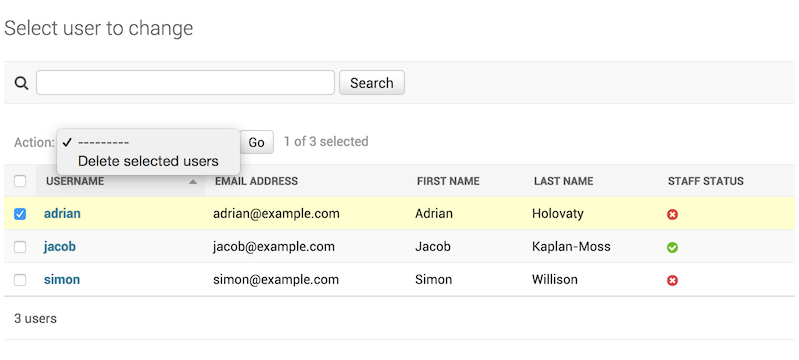
An admin action is simply the ability to apply a bulk operation to selected objects — such as deleting all selected users. The image below illustrates what we’re talking about.
In this article, we’ll write new actions in our admin.py file to make certain bulk operations easier.
Let’s say I have the following model, which I wrote for banning IP addresses. A banned IP will not be able to access the site and will receive an error:
/models.py
from django.db import models

class IPModel(models.Model):
    address = models.GenericIPAddressField(unique=True, verbose_name="Ip address")
    ban = models.BooleanField(default=0)
Writing an Action Function
An action function is a regular function that takes 3 parameters:
- ModelAdmin
- HttpRequest
- QuerySet
Our function won’t use ModelAdmin or HttpRequest — those are required by Django. We’ll use QuerySet.
For example:
def remove_ban(modeladmin, request, queryset):
    queryset.update(ban=False)
This approach is performant. You can also do it like this:
for obj in queryset:
    do_something_with(obj)
Either way, the incoming object is a queryset built from the model you provided.
def remove_ban(modeladmin, request, queryset):
    queryset.update(ban=False)
remove_ban.short_description = 'Remove Ban'
Notice that we assigned a short_description attribute to the remove_ban function. Django uses this value as the list_display label in the admin panel. Now let’s write the admin side for our model. /admin.py
from django.contrib.admin import ModelAdmin, site
from django.http import Http404

from .models import IPModel

def remove_ban(modeladmin, request, queryset):
    queryset.update(ban=False)
remove_ban.short_description = 'Remove Ban'

def banned(modeladmin, request, queryset):
    queryset.update(ban=True)
banned.short_description = 'Banned'

class IPAdmin(ModelAdmin):
    list_display = ["address", , "ban"]
    list_display_links = ["address",, "ban"]
    list_filter = ["ban"]
    search_fields = ["address"]
    fields = (
        ("address"),
        ("ban"),
    )
    actions = [remove_ban, banned]

site.register(IPModel, IPAdmin)
In the admin.py file above I wrote two admin action functions and registered them with my ModelAdmin class using actions = [remove_ban, banned]. Django now knows that my IPAdmin object has two actions and understands their purpose.
Now I can go to the admin page, select multiple IP addresses, and bulk-ban or unban them.