 Hakan Çelik
· Hakan Çelik · OpenCV / Image Processing · 4 dk okuma
Image Pyramids
Image Pyramids
Image Pyramids
Goal
In this section,
- We will learn about image pyramids
- We will use image pyramids to create a new fruit, “Orapple”
- And we will see these functions:
cv2.pyrUp(),cv2.pyrDown()
Theory
Normally, we work with an image of constant size. But on some occasions we need to work with images of different resolutions of the same image. For example, while searching for something in an image, such as a face, we are not sure about the size the object may appear in the image. In that case, we need to create a set of images with different resolutions and search for objects in all the images. These set of images with different resolutions are called Image Pyramids ( because when they are kept in a stack with the biggest image at the bottom and the smallest image at top, it looks like a pyramid. ).
There are two kinds of Image Pyramids
- Gaussian Pyramid
- Laplacian Pyramids
Higher level ( low resolution ) in a Gaussian pyramid is formed by removing consecutive rows and columns in the lower level ( higher resolution ) image. Then each pixel in higher level is formed from the contribution of 5 pixels in underlying level with Gaussian weights.
By doing so, a M x N image becomes M/2 x N/2 image.
So the area reduces to one-quarter of the original area. It is called an Octave. The same pattern continues as we go lower in the pyramid ( i.e., resolution decreases ). Similarly, while expanding, the area becomes 4 times in each level. We can find the Gaussian pyramids using cv2.pyrDown() and cv2.pyrUp() functions.
img = cv2.imread('messi5.jpg')
lower_reso = cv2.pyrDown(higher_reso)
Below are the 4 levels in an image pyramid.
Now you can go down the image pyramid with the cv2.pyrUp() function. higher_reso2 = cv2.pyrUp(lower_reso)
Remember, higher_reso2 is not equal to higher_reso, because once you decrease the resolution you lose the information. The image below is the pyramid created from the smallest image in the previous case at 3 levels below. Compare it with the original image.
Laplacian Pyramids are formed from the Gaussian Pyramids. There is no exclusive function for that. Laplacian pyramid images are like edge images only. Most of its elements are zeros. They are used in image compression. A level in Laplacian Pyramid is formed by the difference between that level in Gaussian Pyramid and expanded version of its upper level in Gaussian Pyramid. The three levels of a Laplacian level will look like below ( contrast is adjusted to enhance the contents ):
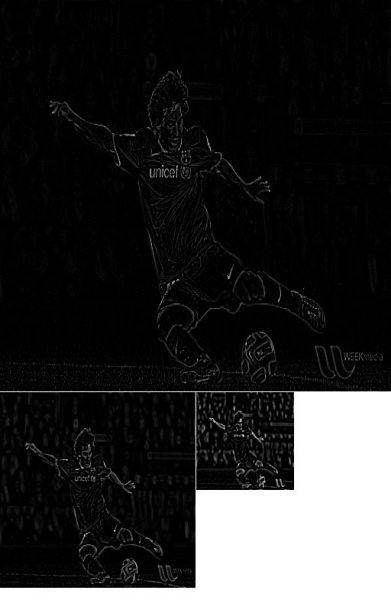
Image Blending using Pyramids
One application of Pyramids is Image Blending. For example, in image stitching, you will need to stack two images together, but it may not look good due to discontinuities between images. In that case, image blending with Pyramids gives you seamless blending without leaving much data in the images. One classical example of this is the blending of two fruits, Orange and Apple. Now see the result already to understand what I am saying:  Please check additional resources and references; this has full diagrammatic details of this image blending, Laplacian Pyramids, etc. Simply it is done as follows:
- Load the two images of Apple and Orange.
- Find the Gaussian Pyramids for Apple and Orange.
- From Gaussian Pyramids, find their Laplacian Pyramids.
- Now join the left half of Apple and right half of Orange in each level of Laplacian Pyramid.
- Finally from this joint image pyramid, reconstruct the original image.
Below is the full code (For the sake of simplicity, each step is done separately which may take more memory. You can optimize it if you want).
import cv2
import numpy as np,sys
A = cv2.imread('apple.jpg')
B = cv2.imread('orange.jpg')
# generate Gaussian pyramid for A
G = A.copy()
gpA = [G]
for i in xrange(6):
    G = cv2.pyrDown(G)
    gpA.append(G)
# generate Gaussian pyramid for B
G = B.copy()
gpB = [G]
for i in xrange(6):
    G = cv2.pyrDown(G)
    gpB.append(G)
# generate Laplacian Pyramid for A
lpA = [gpA[5]]
for i in xrange(5,0,-1):
    GE = cv2.pyrUp(gpA[i])
    L = cv2.subtract(gpA[i-1],GE)
    lpA.append(L)
# generate Laplacian Pyramid for B
lpB = [gpB[5]]
for i in xrange(5,0,-1):
    GE = cv2.pyrUp(gpB[i])
    L = cv2.subtract(gpB[i-1],GE)
    lpB.append(L)
# Now add left and right halves of images in each level
LS = []
for la,lb in zip(lpA,lpB):
    rows,cols,dpt = la.shape
    ls = np.hstack((la[:,0:cols/2], lb[:,cols/2:]))
    LS.append(ls)
# now reconstruct
ls_ = LS[0]
for i in xrange(1,6):
    ls_ = cv2.pyrUp(ls_)
    ls_ = cv2.add(ls_, LS[i])
# image with direct connections for each half
real = np.hstack((A[:,:cols/2],B[:,cols/2:]))
cv2.imwrite('Pyramid_blending2.jpg',ls_)
cv2.imwrite('Direct_blending.jpg',real)


