Hakan Çelik
· Hakan Çelik · OpenCV / Feature Detection · 4 dk okuma
Feature Matching
Feature Matching
Goal
In this chapter:
- We will see how to match features in one image with others.
- We will use the Brute-Force matcher and FLANN Matcher in OpenCV
Basics of Brute-Force Matcher
Brute-Force matcher is simple. It takes the descriptor of one feature in first set and is matched with all other features in second set using some distance calculation. And the closest one is returned.
For BF matcher, first we have to create the BFMatcher object using cv.BFMatcher(). It takes two optional params:
- normType — specifies the distance measurement to be used. By default, it is cv.NORM_L2. For binary string based descriptors like ORB, BRIEF, BRISK etc, cv.NORM_HAMMING should be used.
- crossCheck — if True, Matcher returns only those matches that are consistent in both directions. It is a good alternative to ratio test proposed by D.Lowe in SIFT paper.
Two important methods are BFMatcher.match() and BFMatcher.knnMatch(). cv.drawMatches() helps us to draw the matches.
Brute-Force Matching with ORB Descriptors
import numpy as np
import cv2 as cv
import matplotlib.pyplot as plt

img1 = cv.imread('box.png', cv.IMREAD_GRAYSCALE)          # queryImage
img2 = cv.imread('box_in_scene.png', cv.IMREAD_GRAYSCALE)  # trainImage

# Initiate ORB detector
orb = cv.ORB_create()

# find the keypoints and descriptors with ORB
kp1, des1 = orb.detectAndCompute(img1, None)
kp2, des2 = orb.detectAndCompute(img2, None)

# create BFMatcher object
bf = cv.BFMatcher(cv.NORM_HAMMING, crossCheck=True)

# Match descriptors.
matches = bf.match(des1, des2)

# Sort them in the order of their distance.
matches = sorted(matches, key=lambda x: x.distance)

# Draw first 10 matches.
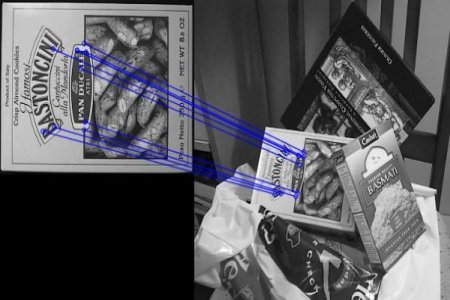
img3 = cv.drawMatches(img1, kp1, img2, kp2, matches[:10], None, flags=cv.DrawMatchesFlags_NOT_DRAW_SINGLE_POINTS)

plt.imshow(img3), plt.show()
Below is the result:
What is this Matcher Object?
The result of matches = bf.match(des1, des2) line is a list of DMatch objects. This DMatch object has following attributes:
- DMatch.distance — Distance between descriptors. The lower, the better it is.
- DMatch.trainIdx — Index of the descriptor in train descriptors
- DMatch.queryIdx — Index of the descriptor in query descriptors
- DMatch.imgIdx — Index of the train image.
Brute-Force Matching with SIFT Descriptors and Ratio Test
import numpy as np
import cv2 as cv
import matplotlib.pyplot as plt

img1 = cv.imread('box.png', cv.IMREAD_GRAYSCALE)
img2 = cv.imread('box_in_scene.png', cv.IMREAD_GRAYSCALE)

# Initiate SIFT detector
sift = cv.SIFT_create()

# find the keypoints and descriptors with SIFT
kp1, des1 = sift.detectAndCompute(img1, None)
kp2, des2 = sift.detectAndCompute(img2, None)

# BFMatcher with default params
bf = cv.BFMatcher()
matches = bf.knnMatch(des1, des2, k=2)

# Apply ratio test
good = []
for m, n in matches:
    if m.distance < 0.75 * n.distance:
        good.append([m])

# cv.drawMatchesKnn expects list of lists as matches.
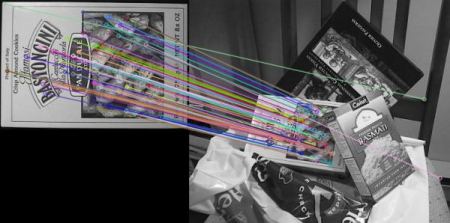
img3 = cv.drawMatchesKnn(img1, kp1, img2, kp2, good, None, flags=cv.DrawMatchesFlags_NOT_DRAW_SINGLE_POINTS)

plt.imshow(img3), plt.show()
See the result below:
FLANN based Matcher
FLANN stands for Fast Library for Approximate Nearest Neighbors. It contains a collection of algorithms optimized for fast nearest neighbor search in large datasets and for high dimensional features. It works faster than BFMatcher for large datasets.
For FLANN based matcher, we need to pass two dictionaries which specifies the algorithm to be used, its related parameters etc.:
# For algorithms like SIFT, SURF etc.:
FLANN_INDEX_KDTREE = 1
index_params = dict(algorithm=FLANN_INDEX_KDTREE, trees=5)

# While using ORB:
FLANN_INDEX_LSH = 6
index_params = dict(algorithm=FLANN_INDEX_LSH,
                    table_number=6,
                    key_size=12,
                    multi_probe_level=1)
import numpy as np
import cv2 as cv
import matplotlib.pyplot as plt
img1 = cv.imread('box.png', cv.IMREAD_GRAYSCALE)
img2 = cv.imread('box_in_scene.png', cv.IMREAD_GRAYSCALE)
sift = cv.SIFT_create()
kp1, des1 = sift.detectAndCompute(img1, None)
kp2, des2 = sift.detectAndCompute(img2, None)
FLANN_INDEX_KDTREE = 1
index_params = dict(algorithm=FLANN_INDEX_KDTREE, trees=5)
search_params = dict(checks=50)
flann = cv.FlannBasedMatcher(index_params, search_params)
matches = flann.knnMatch(des1, des2, k=2)
matchesMask = [[0, 0] for i in range(len(matches))]
for i, (m, n) in enumerate(matches):
if m.distance < 0.7 * n.distance:
matchesMask[i] = [1, 0]
draw_params = dict(matchColor=(0, 255, 0),
singlePointColor=(255, 0, 0),
matchesMask=matchesMask,
flags=cv.DrawMatchesFlags_DEFAULT)
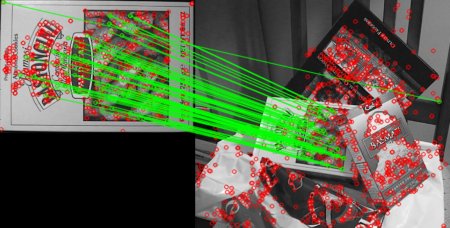
img3 = cv.drawMatchesKnn(img1, kp1, img2, kp2, matches, None, **draw_params)
plt.imshow(img3), plt.show()See the result below: