Hakan Çelik
· Hakan Çelik · OpenCV / Image Processing · 3 dk okuma
Geometric Transformations of Images

Geometric Transformations of Images
Goals
- We will learn how to apply different geometric transformations to images such as translation, rotation, and affine transformation.
- We will learn this function:
cv2.getPerspectiveTransform
Transformations
Transformations
OpenCV provides two transformation functions, cv2.warpAffine and cv2.warpPerspective, with which you can have all kinds of transformations. cv2.warpAffine takes a 2x3 transformation matrix while cv2.warpPerspective takes a 3x3 transformation matrix as input.
Scaling
Scaling
Scaling is just resizing of the image. OpenCV comes with a function cv2.resize() for this purpose. The size of the image can be specified manually, or you can specify the scaling factor. Different interpolation methods are used. Preferable interpolation methods are cv2.INTER_AREA for shrinking and cv2.INTER_CUBIC(slow) and cv2.INTER_LINEAR for zooming. By default, the interpolation method cv2.INTER_LINEAR is used for all resizing purposes. You can resize an input image with either of the following methods:
import cv2
import numpy as np
img = cv2.imread('messi5.jpg') # reading the image
res = cv2.resize(img,None,fx=2, fy=2, interpolation = cv2.INTER_CUBIC) # resized
#or
height, width = img.shape[:2]
res = cv2.resize(img,(2*width, 2*height), interpolation = cv2.INTER_CUBIC) # resized
Translation
Translation is the shifting of the object’s location. If you know the shift in (x,y) direction, you can create the transformation matrix as follows:
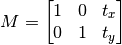
You can make it into a Numpy array of type np.float32 and pass it into cv2.warpAffine() function. See the below example for a shift of (100,50):
import cv2
import numpy as np
img = cv2.imread('messi5.jpg',0)
rows,cols = img.shape
M = np.float32([[1,0,100],[0,1,50]])
dst = cv2.warpAffine(img,M,(cols,rows))
cv2.imshow('img',dst)
cv2.waitKey(0)
cv2.destroyAllWindows()
The third argument of the cv2.warpAffine() function is the size of the output image, which should be in the form of (width, height). Remember width = number of columns, and height = number of rows.
Rotation
Rotation of an image for an angle is achieved by the transformation matrix of the form: 

But OpenCV provides scaled rotation with adjustable center of rotation so that you can rotate at any location you prefer. Modified transformation matrix is given by:

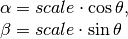
To find this transformation matrix, OpenCV provides a function cv2.getRotationMatrix2D. Check the below example which rotates the image by 90 degree with respect to center without any scaling.
img = cv2.imread('messi5.jpg',0)
rows,cols = img.shape
M = cv2.getRotationMatrix2D((cols/2,rows/2),90,1)
dst = cv2.warpAffine(img,M,(cols,rows))
Affine Transformation
Affine Transformation
In affine transformation, all parallel lines in the original image will still be parallel in the output image. To find the transformation matrix, we need three points from the input image and their corresponding locations in the output image. Then cv2.getAffineTransform will create a 2x3 matrix which is to be passed to cv2.warpAffine.
Check the below example, and also look at the points I selected (they are marked in Green color):
img = cv2.imread('drawing.png')
rows,cols,ch = img.shape
pts1 = np.float32([[50,50],[200,50],[50,200]])
pts2 = np.float32([[10,100],[200,50],[100,250]])
M = cv2.getAffineTransform(pts1,pts2)
dst = cv2.warpAffine(img,M,(cols,rows))
plt.subplot(121),plt.imshow(img),plt.title('Input')
plt.subplot(122),plt.imshow(dst),plt.title('Output')
plt.show()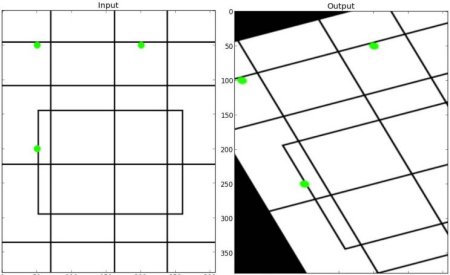
Perspective Transformation
Perspective Transformation
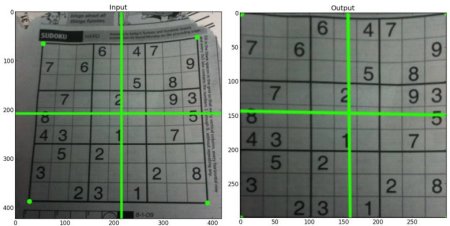
For perspective transformation, you need a 3x3 transformation matrix. Straight lines will remain straight even after the transformation. To find this transformation matrix, you need 4 points on the input image and corresponding points on the output image. Among these 4 points, 3 of them should not be collinear. Then the transformation matrix can be found by cv2.getPerspectiveTransform. Then apply cv2.warpPerspective with this 3x3 transformation matrix.
img = cv2.imread('sudokusmall.png')
rows,cols,ch = img.shape
pts1 = np.float32([[56,65],[368,52],[28,387],[389,390]])
pts2 = np.float32([[0,0],[300,0],[0,300],[300,300]])
M = cv2.getPerspectiveTransform(pts1,pts2)
dst = cv2.warpPerspective(img,M,(300,300))
plt.subplot(121),plt.imshow(img),plt.title('Input')
plt.subplot(122),plt.imshow(dst),plt.title('Output')
plt.show()