Hakan Çelik
· Hakan Çelik · OpenCV / Image Processing · 4 dk okuma
Hough Line Transform
Hough Line Transform
Goals
In this chapter:
- We will understand the concept of the Hough Transform.
- We will see how to use it to detect lines in an image.
- We will see the following functions:
cv2.HoughLines(),cv2.HoughLinesP()
Theory
The Hough Transform is a popular technique to detect any shape, if you can represent that shape in a mathematical form. It can detect the shape even if it is broken or distorted a little bit. We will see how it works for a line.
A line can be represented as y = mx + c or in a parametric form as:
ρ = x·cos(θ) + y·sin(θ)
where ρ is the perpendicular distance from the origin to the line, and θ is the angle formed by this perpendicular line and the horizontal axis measured in counter-clockwise. Check the image below:

So if the line is passing below the origin, it will have a positive rho and an angle less than 180. If it is going above the origin, instead of taking an angle greater than 180, the angle is taken less than 180, and rho is taken negative. Any vertical line will have 0 degree and horizontal lines will have 90 degree.
Any line can be represented in these two terms (ρ, θ). So first it creates a 2D array or accumulator (to hold the values of the two parameters) and it is set to 0 initially. Let rows denote the ρ and columns denote the θ. Size of array depends on the accuracy you need. Suppose you want the accuracy of angles to be 1 degree, you will need 180 columns.
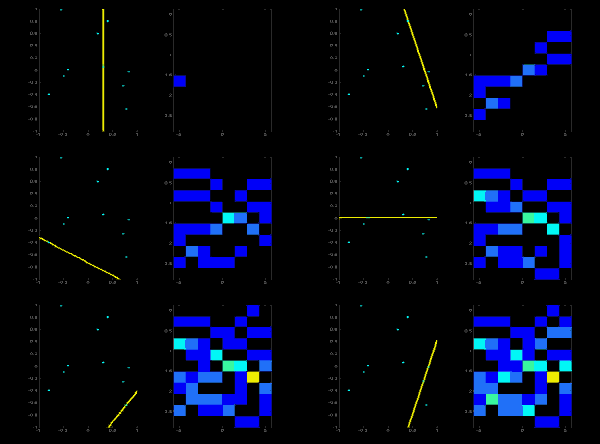
Consider a 100x100 image with a horizontal line at the middle. Take the first point of the line. You know its (x,y) values. Now in the line equation, put the values θ = 0, 1, 2,...,180 and check the ρ you get. For every (ρ, θ) pair, you increment value by one in our accumulator in its corresponding (ρ, θ) cells.
You continue this process for every point on the line. At each point, the cell (50,90) will be incremented, while other cells may or may not be voted up. At the end, the cell (50,90) will have maximum votes, saying there is a line at distance 50 from origin at angle 90 degrees. Below animation shows this process:
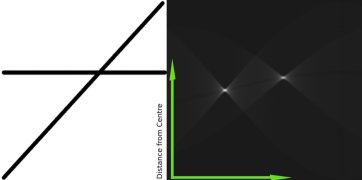
Below is an image which shows the accumulator. Bright spots at some locations denote they are the parameters of possible lines in the image:
Hough Transform in OpenCV
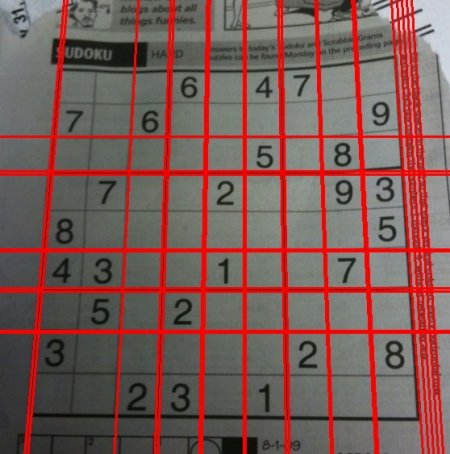
Everything explained above is encapsulated in the OpenCV function cv2.HoughLines(). It simply returns an array of (ρ, θ) values. ρ is measured in pixels and θ is measured in radians.
- 1st parameter: Input image — should be a binary image, so apply threshold or use canny edge detection before applying hough transform.
- 2nd and 3rd parameters:
ρandθaccuracies respectively. - 4th parameter (threshold): Minimum vote it should get to be considered as a line. Remember, number of votes depends upon number of points on the line.
import cv2 as cv
import numpy as np

img = cv.imread('sudoku.png')
gray = cv.cvtColor(img, cv.COLOR_BGR2GRAY)
edges = cv.Canny(gray, 50, 150, apertureSize=3)

lines = cv.HoughLines(edges, 1, np.pi / 180, 200)
for line in lines:
    rho, theta = line[0]
    a = np.cos(theta)
    b = np.sin(theta)
    x0 = a * rho
    y0 = b * rho
    x1 = int(x0 + 1000 * (-b))
    y1 = int(y0 + 1000 * (a))
    x2 = int(x0 - 1000 * (-b))
    y2 = int(y0 - 1000 * (a))
    cv.line(img, (x1, y1), (x2, y2), (0, 0, 255), 2)

cv.imwrite('houghlines3.jpg', img)
Check the results below:
Probabilistic Hough Transform
In the hough transform, even for a line with two arguments, it takes a lot of computation. Probabilistic Hough Transform is an optimization of the Hough Transform. It doesn’t take all the points into consideration. Instead, it takes only a random subset of points which is sufficient for line detection. We just have to decrease the threshold. See image below which compares Hough Transform and Probabilistic Hough Transform in Hough space:
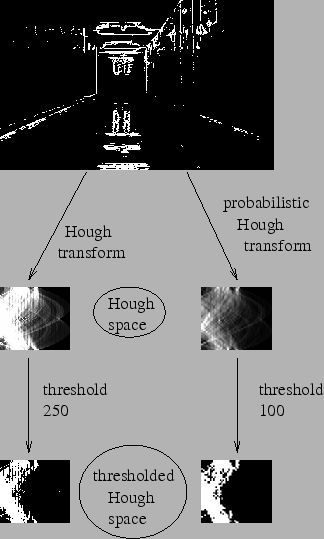
OpenCV implementation is based on Robust Detection of Lines Using the Progressive Probabilistic Hough Transform. The function used is cv2.HoughLinesP(). It has two new arguments:
- minLineLength: Minimum length of line. Line segments shorter than this are rejected.
- maxLineGap: Maximum allowed gap between line segments to treat them as a single line.
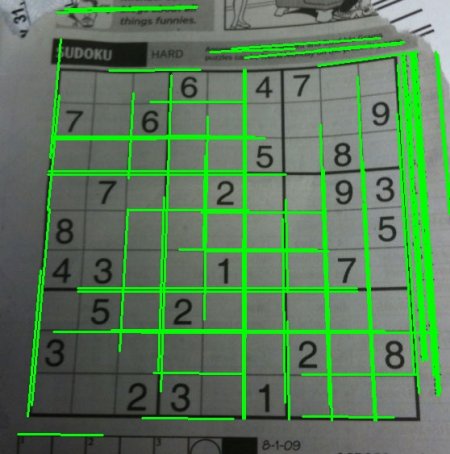
Best thing is that it directly returns the two endpoints of lines:
import cv2 as cv
import numpy as np

img = cv.imread('sudoku.png')
gray = cv.cvtColor(img, cv.COLOR_BGR2GRAY)
edges = cv.Canny(gray, 50, 150, apertureSize=3)

lines = cv.HoughLinesP(edges, 1, np.pi / 180, 100, minLineLength=100, maxLineGap=10)
for line in lines:
    x1, y1, x2, y2 = line[0]
    cv.line(img, (x1, y1), (x2, y2), (0, 255, 0), 2)

cv.imwrite('houghlines5.jpg', img)
See the results below: