 Hakan Çelik
· Hakan Çelik · OpenCV / Advanced Topics · 4 dk okuma
Contours Hierarchy
Contours Hierarchy
Goal
This time, we learn about the hierarchy of contours, i.e. the parent-child relationship in Contours.
Theory
When we found the contours in image using cv2.findContours() function, we passed an argument, Contour Retrieval Mode. We usually passed cv2.RETR_LIST or cv2.RETR_TREE and it worked nice. But what does it actually mean?
Also, in the output, we got three arrays, first is the image, second is our contours, and one more output which we named as hierarchy. But we never used this hierarchy anywhere. Then what is this hierarchy and what is it for?
What is Hierarchy?
Normally we use cv2.findContours() function to detect objects in an image. Sometimes objects are in different locations. But in some cases, some shapes are inside other shapes. Just like nested figures. In this case, we call outer one as parent and inner one as child. Representation of this relationship is called the Hierarchy.
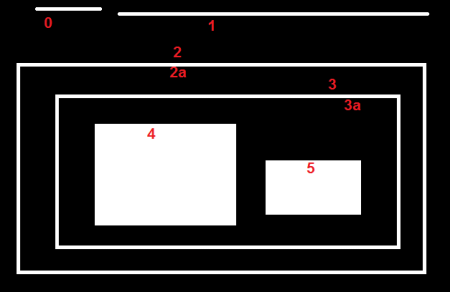
Consider an example image below:
In this image, there are a few shapes which I have numbered from 0-5. 2 and 2a denotes the external and internal contours of the outermost box.
Here, contours 0,1,2 are external or outermost. They are in hierarchy-0 or simply they are in same hierarchy level.
Next comes contour-2a. It can be considered as a child of contour-2 (or in opposite way, contour-2 is parent of contour-2a). So let it be in hierarchy-1. Similarly contour-3 is child of contour-2 and it comes in next hierarchy. Finally contours 4,5 are the children of contour-3a, and they come in the last hierarchy level.
Hierarchy Representation in OpenCV
So each contour has its own information regarding what hierarchy it is, who is its child, who is its parent etc. OpenCV represents it as an array of four values: [Next, Previous, First_Child, Parent]
- Next: denotes next contour at the same hierarchical level.
- Previous: denotes previous contour at the same hierarchical level.
- First_Child: denotes its first child contour.
- Parent: denotes index of its parent contour.
Note: If there is no child or parent, that field is taken as -1.
Contour Retrieval Mode
1. RETR_LIST
This is the simplest of the four flags. It simply retrieves all the contours, but doesn’t create any parent-child relationship. Parents and kids are equal under this rule, and they are just contours. ie they all belongs to same hierarchy level.
>>> hierarchy
array([[[ 1, -1, -1, -1],
        [ 2,  0, -1, -1],
        [ 3,  1, -1, -1],
        [ 4,  2, -1, -1],
        [ 5,  3, -1, -1],
        [ 6,  4, -1, -1],
        [ 7,  5, -1, -1],
        [-1,  6, -1, -1]]])
This is the good choice to use in your code, if you are not using any hierarchy features.
2. RETR_EXTERNAL
If you use this flag, it returns only extreme outer flags. All child contours are left behind. Only the eldest in every family is taken care of. It doesn’t care about other members of the family.
>>> hierarchy
array([[[ 1, -1, -1, -1],
        [ 2,  0, -1, -1],
        [-1,  1, -1, -1]]])
You can use this flag if you want to extract only the outer contours.
3. RETR_CCOMP
This flag retrieves all the contours and arranges them to a 2-level hierarchy. ie external contours of the object (ie its boundary) are placed in hierarchy-1. And the contours of holes inside object (if any) is placed in hierarchy-2.
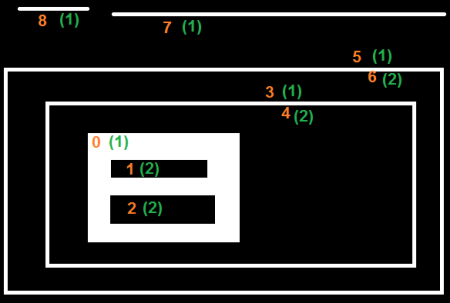
For example, for contour-0: it is hierarchy-1, has two holes contours 1&2 in hierarchy-2. So Next = 3, Previous = -1, First_Child = 1, Parent = -1. So hierarchy array is [3,-1,1,-1].
>>> hierarchy
array([[[ 3, -1,  1, -1],
        [ 2, -1, -1,  0],
        [-1,  1, -1,  0],
        [ 5,  0,  4, -1],
        [-1, -1, -1,  3],
        [ 7,  3,  6, -1],
        [-1, -1, -1,  5],
        [ 8,  5, -1, -1],
        [-1,  7, -1, -1]]])
4. RETR_TREE
And this is the final guy. It retrieves all the contours and creates a full family hierarchy list. It even tells, who is the grandpa, father, son, grandson and even beyond…
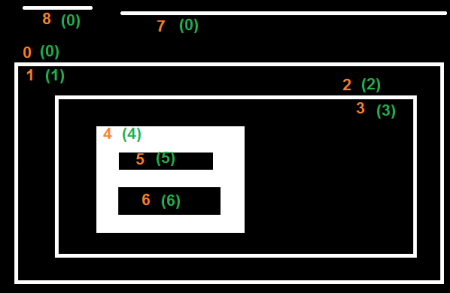
Take contour-0: It is in hierarchy-0. Next contour in same hierarchy is contour-7. No previous contours. Child is contour-1. And no parent. So array is [7,-1,1,-1].
>>> hierarchy
array([[[ 7, -1,  1, -1],
        [-1, -1,  2,  0],
        [-1, -1,  3,  1],
        [-1, -1,  4,  2],
        [-1, -1,  5,  3],
        [ 6, -1, -1,  4],
        [-1,  5, -1,  4],
        [ 8,  0, -1, -1],
        [-1,  7, -1, -1]]])


