 Hakan Çelik
· Hakan Çelik · OpenCV / Feature Detection · 3 dk okuma
Understanding Features
Understanding Features
Goal
In this chapter, we will just try to understand what are features, why are they important, why corners are important etc.
Explanation
Most of you will have played the jigsaw puzzle games. You get a lot of small pieces of an image, where you need to assemble them correctly to form a big real image. The question is, how you do it? What about the projecting the same theory to a computer program so that computer can play jigsaw puzzles?
The answer is, we are looking for specific patterns or specific features which are unique, can be easily tracked and can be easily compared. If someone asks you to point out one good feature which can be compared across several images, you can point out one. That is why even small children can simply play these games. We search for these features in an image, find them, look for the same features in other images and align them. What are these features?
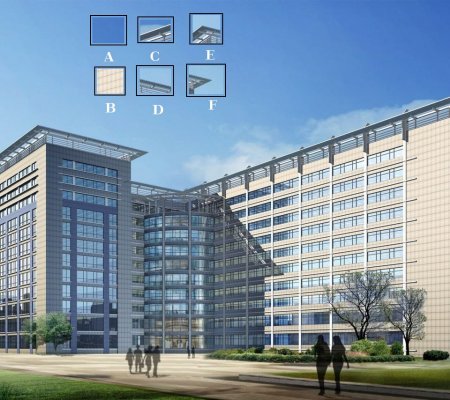
Take the image below:
The image is very simple. At the top of image, six small image patches are given. Question for you is to find the exact location of these patches in the original image.
A and B are flat surfaces and they are spread over a lot of area. It is difficult to find the exact location of these patches.
C and D are much more simple. They are edges of the building. You can find an approximate location, but exact location is still difficult. This is because the pattern is same everywhere along the edge.
Finally, E and F are some corners of the building. And they can be easily found. Because at the corners, wherever you move this patch, it will look different. So they can be considered as good features. So now we move into simpler (and widely used image) for better understanding.
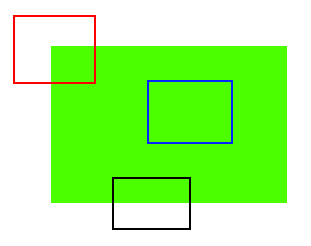
Just like above, the blue patch is flat area and difficult to find and track. The black patch has an edge. If you move it in vertical direction (i.e. along the gradient) it changes. Moved along the edge (parallel to edge), it looks the same. And for red patch, it is a corner. Wherever you move the patch, it looks different, means it is unique. So basically, corners are considered to be good features in an image.
So now we answered our question, “what are these features?“. But next question arises. How do we find them? We answered that in an intuitive way, i.e., look for the regions in images which have maximum variation when moved (by a small amount) in all regions around it. So finding these image features is called Feature Detection.
We found the features in the images. Once you have found it, you should be able to find the same in the other images. Basically, you are describing the feature. So called description is called Feature Description. Once you have the features and its description, you can find same features in all images and align them, stitch them together or do whatever you want.
So in this module, we are looking to different algorithms in OpenCV to find features, describe them, match them etc.



