 Hakan Çelik
· Hakan Çelik · OpenCV / Feature Detection · 3 dk okuma
Harris Corner Detection
Harris Corner Detection
Goal
In this chapter,
- We will understand the concepts behind Harris Corner Detection.
- We will see the following functions: cv.cornerHarris(), cv.cornerSubPix()
Theory
In the last chapter, we saw that corners are regions in the image with large variation in intensity in all the directions. One early attempt to find these corners was done by Chris Harris & Mike Stephens in their paper A Combined Corner and Edge Detector in 1988, so now it is called the Harris Corner Detector.
It basically finds the difference in intensity for a displacement of (u,v) in all directions:
E(u,v) = Σ w(x,y) [I(x+u,y+v) - I(x,y)]²
The window function is either a rectangular window or a Gaussian window which gives weights to pixels underneath.
We have to maximize this function E(u,v) for corner detection. Applying Taylor Expansion and using some mathematical steps, we get the final equation as:
E(u,v) ≈ [u v] M [u; v]
where:
M = Σ w(x,y) [[Ix² IxIy]; [IxIy Iy²]]
Here, Ix and Iy are image derivatives in x and y directions respectively.
Then comes the main part. After this, they created a score, basically an equation, which determines if a window can contain a corner or not.
R = det(M) - k(trace(M))²
where:
- det(M) = λ₁λ₂
- trace(M) = λ₁ + λ₂
- λ₁ and λ₂ are the eigenvalues of M
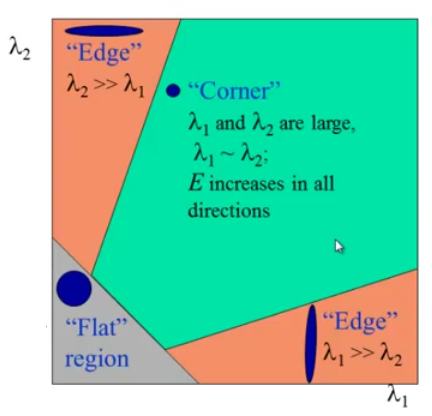
So the magnitudes of these eigenvalues decide whether a region is a corner, an edge, or flat.
- When |R| is small → flat region
- When R < 0 → edge
- When R is large → corner
It can be represented in a nice picture as follows:
Harris Corner Detector in OpenCV
OpenCV has the function cv.cornerHarris() for this purpose. Its arguments are:
- img — Input image. It should be grayscale and float32 type.
- blockSize — It is the size of neighbourhood considered for corner detection
- ksize — Aperture parameter of the Sobel derivative used.
- k — Harris detector free parameter in the equation.
See the example below:
import numpy as np
import cv2 as cv

filename = 'chessboard.png'
img = cv.imread(filename)
gray = cv.cvtColor(img, cv.COLOR_BGR2GRAY)

gray = np.float32(gray)
dst = cv.cornerHarris(gray, 2, 3, 0.04)

# result is dilated for marking the corners, not important
dst = cv.dilate(dst, None)

# Threshold for an optimal value, it may vary depending on the image.
img[dst > 0.01 * dst.max()] = [0, 0, 255]

cv.imshow('dst', img)
if cv.waitKey(0) & 0xff == 27:
    cv.destroyAllWindows()
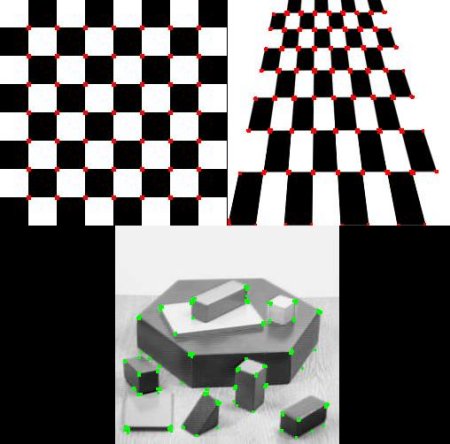
Below are the three results:
Corner with SubPixel Accuracy
Sometimes, you may need to find the corners with maximum accuracy. OpenCV comes with a function cv.cornerSubPix() which further refines the corners detected with sub-pixel accuracy. Below is an example. As usual, we need to find the Harris corners first. Then we pass the centroids of these corners to refine them. Harris corners are marked in red pixels and refined corners are marked in green pixels.
import numpy as np
import cv2 as cv

filename = 'chessboard2.jpg'
img = cv.imread(filename)
gray = cv.cvtColor(img, cv.COLOR_BGR2GRAY)

# find Harris corners
gray = np.float32(gray)
dst = cv.cornerHarris(gray, 2, 3, 0.04)
dst = cv.dilate(dst, None)
ret, dst = cv.threshold(dst, 0.01 * dst.max(), 255, 0)
dst = np.uint8(dst)

# find centroids
ret, labels, stats, centroids = cv.connectedComponentsWithStats(dst)

# define the criteria to stop and refine the corners
criteria = (cv.TERM_CRITERIA_EPS + cv.TERM_CRITERIA_MAX_ITER, 100, 0.001)
corners = cv.cornerSubPix(gray, np.float32(centroids), (5, 5), (-1, -1), criteria)

# Now draw them
res = np.hstack((centroids, corners))
res = np.int0(res)
img[res[:, 1], res[:, 0]] = [0, 0, 255]
img[res[:, 3], res[:, 2]] = [0, 255, 0]

cv.imwrite('subpixel5.png', img)
Below is the result, where some important locations are shown in the zoomed window to visualize:




