 Hakan Çelik
· Hakan Çelik · OpenCV / Camera Calibration · 2 dk okuma
Depth Map from Stereo Images
Depth Map from Stereo Images
Goal
In this session,
- We will learn to create a depth map from stereo images.
Basics
In the last session, we saw basic concepts like epipolar constraints and other related terms. We also saw that if we have two images of same scene, we can get depth information from that in an intuitive way. Below image contains equivalent triangles:
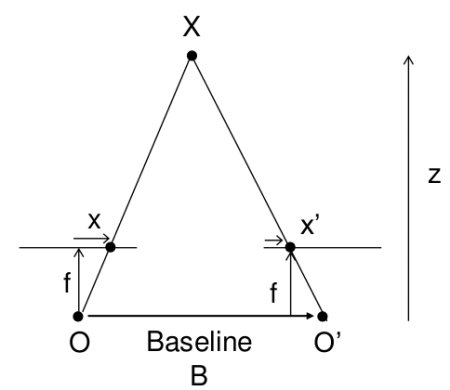
Writing their equivalent equations will yield us following result:
disparity = x - x’ = Bf/Z
x and x’ are the distance between points in image plane corresponding to the scene point 3D and their camera center. B is the distance between two cameras (which we know) and f is the focal length of camera (already known). So the depth of a point in a scene is inversely proportional to the difference in distance of corresponding image points and their camera centers.
Code
Below code snippet shows a simple procedure to create a disparity map:
import numpy as np
import cv2 as cv
from matplotlib import pyplot as plt

imgL = cv.imread('tsukuba_l.png', cv.IMREAD_GRAYSCALE)
imgR = cv.imread('tsukuba_r.png', cv.IMREAD_GRAYSCALE)

stereo = cv.StereoBM.create(numDisparities=16, blockSize=15)
disparity = stereo.compute(imgL, imgR)
plt.imshow(disparity, 'gray')
plt.show()
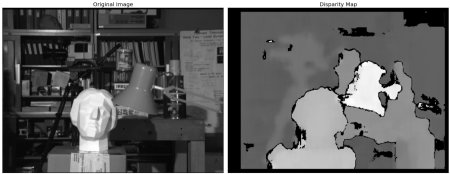
Below image contains the original image (left) and its disparity map (right):
As you can see, the result is contaminated with high degree of noise. By adjusting the values of numDisparities and blockSize, you can get a better result.
There are some parameters when you get familiar with StereoBM:
- texture_threshold — Filters out areas that don’t have enough texture for reliable matching
- Speckle range and size — Block-based matchers often produce “speckles” near the boundaries of objects; these parameters post-process the disparity image with a speckle filter
- numDisparities — How many pixels to slide the window over. The larger it is, the larger the range of visible depths
- min_disparity — The offset from the x-position of the left pixel at which to begin searching
- uniqueness_ratio — Another post-filtering step; if the best matching disparity is not sufficiently better than every other disparity, the pixel is filtered out
Additional Resources
Exercises
- OpenCV samples contain an example of generating disparity map and its 3D reconstruction. Check stereo_match.py in OpenCV-Python samples.



